Wednesday, 8 March 2017

Simple personalised bunting using Silhouette Cameo

Hello Silhouette fans!

Maria here today with my first ever project for Silhouette UK! Since this is my first ever project, I wanted to go for something simple and that I know well: personalised paper bunting (well, I say paper, but it is actually made with good quality cardstock!)


WHAT YOU WILL NEED:

The colours are up to you and your personal taste, but I will be using:
  • Silhouette Cameo®
  • 12x12 white cardstock
  • 12x12 pink patterned paper
  • 5x12 pink cardstock
  • 2.5x12 white cardstock
  • 2x12 black cardstock (or a smaller piece)
  • ·         Glue, thread/ribbon and any other finishing touches that you may like.

    All sizes are approximate, and depending on how big or small you want your project to be! You can also use the Silhouette Portrait if that is the machine that you have... Just adjust your paper size and make sure you fit all your shapes in an A4 page!
      Instructions:

      Open a new document in your Silhouette Studio and import the bunting file (design #30802) from your library. I am only going to use the triangle shape, so I went ahead and ungrouped the shape and deleted the ones I was not going to use. Resize as required:  I want my bunting to be approximately 15cms tall, so I make sure that I press shift in my keyboard to maintain the proportions of the object whilst I drag the bottom right corner until I reach the approximate size I want. I want to make the most use of the space, so I notice that if I bring the size down just a notch I will be able to fit more shapes in my 12x12 cardstock.


       Now I add some small holes on the top edge of my bunting which will be super useful for threading your ribbon or whatever you are using for putting the bunting together.


      This is going to be the base of my bunting and it will be cut in white cardstock. Next I create the triangle which will be cut with pattern paper. I copy and paste the current triangle and then resize it slightly smaller. I now add the scallop shape (Design ID #2213) and also draw a circle to fit inside the scallop, using the ellipse tool in the left bar. In order to get a perfect circle make sure you are holding down the shift key on your keyboard whilst creating it.


      So this is the basic shape of your bunting done! Now the fun begins… Separate each individual shape and temporarily put it in the grey area of your work space. Now, one by one, bring each shape into your design mat and duplicate it as many times as you need! The name I want to use is Laura, which is five letters long, so I need at least five of every shape! However, I want to make the best of my cardstock, so I will be cutting 6 or 7 shapes, and keeping one spare just in case something goes wrong!

      For cutting, I actually brought the cirlces, scallop and words into the 12x12 mat as they were all going to be cut with the same settings.
   
      Now it’s time to send to Silhouette and cut! For all the cardstock shapes, I am using the settings for Plain Cardstock, however, I like to make sure that I go slow so I modify the settings slightly as per the screenshot below. Those settings have always worked well for me with 170-200gsm card!
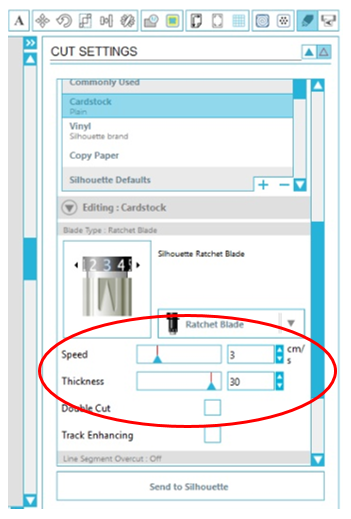


      Now, it’s time to cut your word! I am cutting the name Laura in black cardstock. The font I have chosen is design #122249 from the Design Store and it’s absolutely gorgeous!

      Lastly, just be careful to change your settings when it’s time to cut the patterned paper! The default settings under patterned paper work well for me, so no need to modify anything.

      
      And those are all the shapes that you need! Once you have cut everything you can assemble your bunting! Feel free to decorate your bunting with other shapes like hearts or butterflies, or anything that you like!

      I hope you have found this tutorial useful and it's inspired you to create your own personalised bunting! Read you soon! 


PRODUCTS AND DESIGNS USED:


Thanks for reading,
Maria x

Monday, 6 March 2017

Introducing the 2017-2018 Silhouette UK Design Team - Niki


Hey there Silhouette Fans, my name is Niki Rowland and I am delighted to be remaining on the Silhouette UK Design Team for another year.  I have really enjoyed the previous year on the team, which has pushed me to really get to know my Silhouette, which I was using a lot before, but not to its full potential. It's my absolutete favourite crafting tool and one I wouldn't be without and I use it on almost every project.

I'm an avid scrapbooker and create almost every day and also enjoy turning my hand to other crafts too. I've been scrapbooking for about 12 years now and have had my Silhouette machine for the last five years. I teach scrapbooking classes locally, jointly run a retreat company called GoGo Getaway and design for Hey Little Magpie.

Here are a few of my favourite projects over the last 12 months on the Design Team:


Using Curved Text and Sketch Pens


Creating your own Cut & Fold files


 I'm really looking forward to sharing more Silhouette tips, tutorials and layouts with you in the upcoming year. Happy scrapping xx 


Sunday, 5 March 2017

Introducing the 2017-2018 Silhouette UK Design Team - Janet Packer


Hello Silhouette UK Blog Readers,

I'm back! My name is Janet Packer and I'm super excited to be back for another year on the Silhouette UK Design Team. I had a wonderful time on the Team last year and really enjoyed learning from, and sharing with, the wider Silhouette Community.  I've included a few of my favourite tutorials here from the past year.

Make Baby Shaker Cards

I've always loved creating and in years past have enthusiastically embraced crafts as diverse as painting, woodwork, upholstery, toymaking, sewing, and dressmaking, as well as all manner of papercrafts and design. I've also adored spending time encouraging my now grown children to create for themselves from an early age.

Cut Felt with Silhouette Cameo® 3

Purchasing a Silhouette Cameo five years ago re-kindled my creativity and I loved its combination of technology and creative potential. I'm the proud owner of a Cameo 3, a Curio, and a Hobby Jack heat press as well as my original Cameo, and use one or other to make just about anything from paper, card, fabric or vinyl.

Cover Eggs with Washi Paper


I'm now live in North East Scotland with my husband and shaggy dog, Beckett, although I come from the Midlands of England and have also lived in London and Northern California. Away from crafting, I enjoy photography, live music, good food and the lovely Scottish countryside.


Custom Colour a Background


Decorate MDF Shapes


Decorate a shirt with Metallic HTV


Fill a Shape with a Pattern

I blog in my own right too under the name of Crafting Quine. Join me for extra details and comment. I'm also loving the fun interaction on Instagram.


   Profile | My Blog | Pinterest | Twitter | Instagram

Saturday, 4 March 2017

Introducing the 2017-2018 Silhouette UK Design Team - Beverley Edwards


Hi! Bev here and I am so so happy to be staying on the design team for another year!  I learned so much last year and created over 40 projects and tutorials for this blog.  I have popped some pics of my favourites below.


I have also had the opportunity to take on magazine projects and that was amazing!! Seeing my projects in print in real life was surreal and definitely a highlight last year.


So, a little bit about me.  I am a mother of a gorgeous 6 year old girl Poppy and a scrummy little 4 year old called Chester.  They inspire me and entertain me on a daily basis!  I married my best friend Wayne 7 years ago and we live in the North West, where we make it our mission to laugh each and every day at least once.

I began my business as a way to stay at home with the babies and not miss a moment with them.  The business has evolved and I have found my calling in leatherwork creating Travelers Notebooks and I adore it!  I launched my Etsy shop last month and I am loving it.  You can take a peek here www.etsy.com/uk/shop/LovefromPoppyDesigns 

I am very much looking forward to more creating this year and sharing projects with you all.  And I can't wait to see what you create too. 

Friday, 3 March 2017

Introducing the 2017-2018 Silhouette UK Design Team - Thelma Turkington


Hello everybody, my name is Thelma and I live in Northern Ireland.

I have two Children (who aren't two children any more) 2 cats and a dog.

I am a full career for my son who has Duchenne Muscular Dystrophy, and have recently fallen into the post of restoration manager in a Victorian weavers mill.

In my free time I like to run craft classes and can often be found at craft fairs.

I have loved making things all my life. From trying to make perfume from rose petals or making beds for my dolls, my gifts were always of the handmade variety.


 I grew up in a very rural location with the ethos of make do and mend and could only dream of having such materials at my disposal such as sticky back plastic and PVA glue as often seen on TV's “here's one I made earlier” shows. I am still  an avid believer on re-purposing things and love using found items in mixed media projects.

The first electronic cutter I used was the Craft Robo, when my sister asked me to make her some signs to put up in her factory.  As soon as I started using the Robo I could see so many more uses for it other than cutting out letters. I was so excited when Graphtec developed the Cameo and I couldn't wait to get my hands on one. Since then I have added the amazing little gem that is the Mint to my craft arsenal. I love how simple and quick it is. It was inevitable, having a particular love of mixed media that the Curio would become my go to machine for embellishments on my projects with its increased clearance and greater cutting depth. 


My approach to craft is “what's the worst can happen”. The first day I had my Cameo it ended up with a very large slice cut into it. I love to help people with their projects, solving little problems that pop up, trying out alternative materials and working out how something was made or could be constructed.

I am really excited to join the design team and looking forward to sharing some ideas with you.


Thursday, 2 March 2017

Introducing the 2017-2018 Silhouette UK Design Team - Marie-Claire Kelly


I’m Marie-Clare, and I’m from Glasgow. I teach English in an inner-city secondary school, and I love my job. However, I went part time two years ago after becoming a single mummy, and decided to spend more time with my son, who is now three.


I’ve always been crafty – my mum is an avid papercrafter and jewellery maker – and for as long as I can remember I’ve made things. My parents bought me an original Silhouette Cameo, and at first I didn’t really use it too often. I realise that it can be a wee bit scary finding your way round the software, and sussing out the machine’s quirks!


When I went part time at work, I set up my own small business making personalised gifts, and my Cameo went into overdrive! The poor thing must have been exhausted. When the Cameo 3 launched, I upgraded, and my old one made its way to the Silhouette Retirement Home – aka, Mum’s craft room.


In December 2016 I took a stall at my very first Christmas Market, and when I photographed my setup, I realised that every single item on my stall had required the Cameo. It has become such an integral part of my crafting.

My bestselling item last year was my personalised family tree cushion, which uses Heat Transfer Vinyl and some strategic offsetting in the design. I particularly like to make sets of personalised wine glasses, and you’d be amazed at some of the things I’ve been asked to put on a champagne flute in my time!


Of course, as well as my business, I also use the Cameo for my own makes. It has helped me to create school displays, lesson resources, decorative bits for my own little house, and games and items for my little boy. In fact, he even helps: he presses the buttons to load and unload the media from “mummy’s fancy machine”.


I’m really looking forward to showing you some of my makes as part of the design team, and I hope that I can inspire you to make something new!


Wednesday, 1 March 2017

Introducing the 2017-2018 Silhouette UK Design Team - Maria La Chica


Hi! I'm Maria and really excited about joining the Silhouette UK Design Team


I am a mother of twins and very keen scrapbooker! I started scrapbooking shortly after my twins were born three and a half years ago and in this time my knowledge has grown and I have developed my own style.


I purchased a Silhouette Cameo over two and a half years ago and fell in love!
I use it quite a lot for non-scrapbooking related projects too, mainly card making and home décor which I really enjoy. 
I can't wait to bring you a variety of projects and share some of my favourite Silhouette products with you


If you would like to see more of my work, please check out the links below


Instagram crafts_by_marialachica (https://www.instagram.com/crafts_by_marialachica/)